

Technical upkeep can quietly consume the hours a growing team needs for customers, hiring and product development. A new laptop takes longer to configure than expected, a meeting room loses connectivity, and a software renewal catches finance by surprise. Each issue seems minor on its own, but the interruptions compound as headcount and office locations increase. The practical fix is to treat workplace technology as an operating system with clear standards, assigned ownership and as much automation as the business can reasonably support.
The Trap of DIY Office Setup
DIY technology setup often works when five people share one room. Someone buys a router, another employee orders laptops and the founder keeps software passwords in a spreadsheet. That informal system starts to strain once the company adds departments, remote employees or another location.
The hidden expense comes from fragmented attention. A manager who spends 20 minutes finding a spare charger may also lose focus before and after the task. Multiply those interruptions across equipment ordering, account access and connectivity problems and the real cost exceeds the price of the hardware. This pattern resembles the issues covered in hidden DIY maintenance costs, where internal labor and delayed core work can make an apparently inexpensive choice costly.
Start by documenting what the team already has. Record each device, assigned employee, purchase date, warranty status and expected replacement date. Add internet service details, network equipment, software subscriptions and vendor contacts. This inventory doesn’t need a complicated platform at first. A controlled spreadsheet can work for a small company if one person owns it and reviews it monthly.
Apply the same discipline to employee workstations. A consistent desk setup can reduce avoidable friction, especially for hybrid staff who move between environments. Guidance on desk setup and productivity highlights how equipment placement and ergonomics affect daily work. Give each role a standard package so new hires receive compatible equipment without restarting the buying process every time.
Centralize Hardware to Cut Overhead
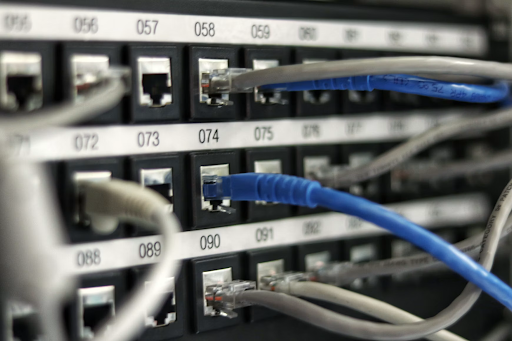
Centralization gives a scaling team one place to view, configure and support its core technology. This can include access points, switches, security applications and connections between sites. When every location uses unrelated equipment and settings, diagnosing a simple connection problem may require several vendor calls and an office visit.
Multi-floor and multi-site businesses without a large internal IT department may benefit from cloud-managed network solutions that bring wireless design, switching, security, licensing and dashboard management into a shared system. A centralized dashboard can help an authorized administrator check device status, apply approved settings and identify which location needs attention before sending someone on-site.
Standardize equipment in planned stages. Begin with the technology that causes the most interruptions, then create an approved list for future purchases. For example, a 40-person company with two offices might select one laptop configuration for general staff, one higher-performance option for technical roles and a standard set of meeting room devices. Procurement becomes faster because managers choose from a short catalog instead of comparing the full market.
Centralization should also reduce the number of disconnected applications used to track work. Software tool sprawl can produce duplicate records, inconsistent permissions and recurring charges that nobody reviews. Before adding another platform, check if an existing system already performs the needed task. Assign an owner to every approved tool and require that person to review active users, integrations and renewal terms at least quarterly.
Automate Routine Maintenance Tasks
Automation works best on repetitive tasks with clear rules. Software updates, device enrollment, account creation, backup alerts and license reminders are strong candidates because each follows a predictable sequence. Automating them reduces missed steps and gives the team a repeatable record of what happened.
Create a basic workflow for employee arrivals and departures. When human resources confirms a start date, the process can trigger an equipment request, account checklist and access approval. A departure notice should prompt account suspension, device return instructions and reassignment of shared files. Keep a human approval step for sensitive access so automation supports oversight instead of bypassing it.
Remote and hybrid teams gain particular value from consistent systems. The right remote productivity technology helps employees communicate and access shared resources without relying on someone in the office to solve every issue. Set automatic update windows outside normal working hours, but give employees advance notice and a limited option to postpone when they’re presenting or finishing time-sensitive work.
Use alerts carefully. If every minor event creates an email or chat notification, people will stop reading them. Group low-priority notices into a daily report and reserve immediate alerts for issues that affect security, multiple employees or a critical service. Each alert should identify the affected system, severity, owner and next action.
Review automated workflows every quarter. Remove steps tied to retired software and update role-based access when responsibilities change. A workflow that saved time last year can create errors if the company’s tools and reporting structure have moved on.

Freeing Leadership for High-Value Work
Technology upkeep should have a clear escalation path so every small problem doesn’t land with a founder or department head. Define who handles common requests, how employees submit them and when an issue needs leadership approval. A shared support channel or ticket form gives the team one dependable route and creates useful records about recurring trouble.
Set response targets based on business impact. A company-wide outage needs immediate attention, while a request for a second monitor can wait for normal procurement. Simple categories keep urgent work visible without encouraging employees to label every inconvenience an emergency.
Strong tech team management also depends on clear goals and accountability. Track a small set of operational measures such as recurring incidents, average resolution time, unassigned devices and upcoming renewals. These figures show where the system needs improvement without filling leadership meetings with technical detail.
A monthly 30-minute review is often enough for a small or midsize team. The technology owner can report repeated problems, replacement needs and decisions that require budget approval. Leaders can then focus on the few choices that affect hiring plans, location growth or customer delivery.
Outside support may make sense when the internal team lacks specialized skills, covers several locations or spends too many hours reacting to problems. Define the provider’s scope in writing, including routine monitoring, escalation contacts, documentation ownership and reporting frequency. Keep company administrators involved in approvals and maintain access to current records so institutional knowledge doesn’t disappear with a vendor change.
The payoff becomes visible in the calendar. When equipment standards, maintenance workflows and escalation rules are established, leadership no longer needs to arbitrate every laptop request or connectivity complaint. The next planning meeting can stay focused on the decisions only leaders can make, while routine upkeep follows a system built to handle it.



























Share in the comments below: Questions go here
Struggling with hurtful feedback affecting your sales? Explore practical tips to handle criticism and improve your business performance today.