
How to Showcase Your Product with Architectural Rendering Before Construction is Complete
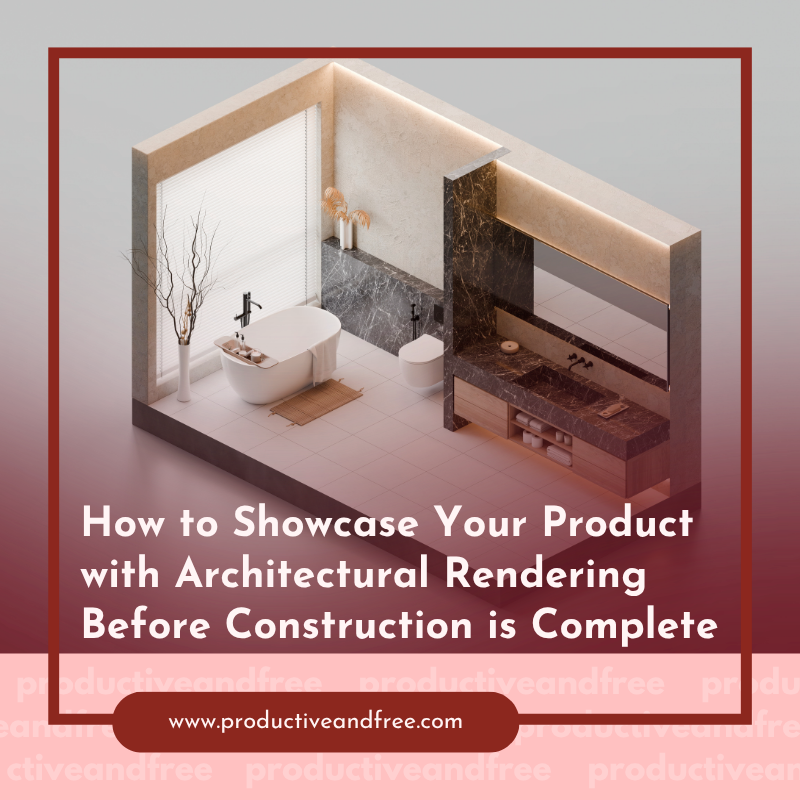
Selling something that does not exist yet creates a simple problem. Customers cannot walk through it, photograph it, or see how it will look in its finished setting. They have to rely on drawings, descriptions, and their own ability to picture the result.
That can make a strong product harder to present, especially when buyers need to understand how it will look in its finished setting. Architectural rendering helps close that gap by turning plans and concepts into detailed visuals that people can actually understand. Autodesk notes that architectural rendering can help teams identify problems early, develop design ideas, and communicate them to clients and partners.
For businesses preparing to launch a product, property, or development, the key is knowing how to use those visuals well. Here are several practical ways to do it.
1. Create a Finished Setting for the Product
A product can be difficult to sell when customers have no idea how it will look once it is actually in use. A rendering can place that product inside the environment it was designed for.
For example, a new lighting fixture can be shown inside a finished room, while a kitchen product can appear within a completed kitchen. This gives potential customers more information than an isolated product image can provide. They can see how the product interacts with the room, complements the surrounding design, and looks in the setting where it will eventually be installed.
This approach is especially useful when the product is connected to a construction or design project that is still underway.
2. Show Different Design Options
One of the biggest advantages of architectural rendering is the ability to show how the same product could look in different settings or with different design choices. Instead of presenting buyers with one finished concept, you can create several versions that help them compare materials, colours, finishes, layouts, or surroundings.
If you want to showcase your product with architectural rendering, displaying these variations can make the presentation much more useful. A customer might prefer one finish over another, or a developer may want to see how a product looks in two different spaces. Those choices can be explored visually before construction begins, when changes are generally easier to make.
This can also help the team behind the project make decisions earlier. That way, the rendering is doing more than making the product look good. It is helping people compare options and decide what should actually be built.
3. Give Buyers a Better Sense of Scale
Size is surprisingly difficult to understand from technical drawings alone. A product may look impressive on paper but seem too large, too small, or poorly positioned once it is placed in an actual environment.
A rendering can provide that missing context. Show the product alongside familiar objects, furniture, people, doors, or other parts of the space so viewers can understand its proportions without having to interpret measurements themselves.
This is one reason 3D visualization is useful during the design process. Research published through Elsevier's Automation in Construction journal found that 3D models can help design teams communicate design intent and compare different options. That makes the rendering useful for more than presentation. It can help customers and project teams understand how the product will actually fit within its intended environment.
4. Use Multiple Views Instead of One Hero Image
One attractive image can grab attention, but it may not answer all the questions a potential customer has.
Consider showing the product from several useful angles. An exterior view might explain how it looks from a distance, while a closer view can show materials and details. An interior or environmental view can then demonstrate how the product works within its intended setting.
Different views can also help communicate elements such as materials, lighting, spatial relationships, and design details that may not be clear from one image alone. ArchDaily discusses these different functions of architectural rendering during the design process.
5. Turn the Renderings Into Marketing Content
Once a product has been rendered, do not limit the visuals to a single presentation. The same project can often produce images for a website, sales presentation, social media posts, brochures, investor materials, or early promotional campaigns. Architectural visualization can also extend beyond still images. Animation, virtual tours, interactive platforms, and VR can give people additional ways to explore a project before it exists.
The type of visual you create will depend on the information available at the start of the project. For example, EnDesign's architectural rendering guidance explains that visualizations can be developed from sketches, floor plans, CAD drawings, and BIM models. The quality and detail of those source materials can also affect how closely the final visual reflects the intended design.
This allows businesses to start presenting and promoting a product before construction is finished. Instead of waiting for photographs of the completed project, they can give potential customers something concrete to see much earlier.
The Bottom Line
Good rendering should help people understand what they are going to get, not create expectations that the finished product cannot meet.
Make sure the materials, colours, dimensions, surroundings, and important design features are represented accurately. If something is still undecided, avoid presenting it as a confirmed feature. This is particularly important when renderings are being used to support sales. A beautiful image may attract attention, but accuracy is what helps maintain trust once the real product is available.
The strongest approach is therefore to treat rendering as part of the product presentation from the beginning. Use it to explain the idea, explore options, answer questions, and give customers a clearer view of what is coming.






















Share in the comments below: Questions go here

Discover how traveling can enhance your understanding of customer needs and preferences. Learn valuable insights to boost your entrepreneurial success.