How to Increase the Value of Your Online Course
As a course creator, one of the trickiest issues you may encounter in developing your course is how to effectively price it.
Set it too low and you run the risk of losing out on potential income and making your course (and by extension, your brand) seem cheap.
On the other hand, if you price it too high, you could turn off even your ideal customers and miss out on the opportunity to genuinely help and serve them.
The good news is that as the course creator, pricing your course is completely within your control — it’s just a matter of actually providing incredible content and communicating its value effectively.
In addition to your core course material (which should be amazingly helpful and valuable on its own), the more and better features, bonuses, or components you add, the easier you can justify charging premium prices.
Here are 7 practical ideas to increase the value of your online course.
1. Course Workbook
If you look around, you’ll find that a typical online course includes some form of video content whether it’s direct-to-camera, slides only, or a mix of both.
While video may be an effective teaching tool, consider providing a custom workbook as an added resource for your students because in my opinion, it’s the easiest way to add value to your course.
A course workbook is simply a document (typically a PDF file) that aims to help your students take action.
You can include your course outline, timeline, framework, checklists, trackers, planners, and other worksheets.
With a well-designed workbook, your students can learn and implement your course lessons much more effectively and therefore get amazing results.
Your students’ amazing results = Proof your course is effective = More course sales
Then if your students decide to print out your workbook, it can become something real and tangible — a great addition to an online course which is a digital product.
Now, you should know that it will take some time to create your course workbook yourself from scratch or it could be pricey if you hire a designer to create it for you.
The good news is that there are templates you could use and we’ve got a Canva workbook template made specifically for course creators!
It comes with 70+ page templates so you can choose the layouts that fit your needs, mix and match, rearrange and duplicate pages as you please.
Click here to check out our 70+ pages Course Workbook Template.
Canva Workbook Template for Courses
Comes with 70+ mix and match pages in easy-to-edit Canva format!

Calling all course creators: Want to increase the value of your online course?
Be sure to provide a custom workbook to help your students learn and get amazing results!
Amazing Results = Proof Your Course is Effective = More Course Sales $$$
And just in case you don’t want to create everything from scratch or hire a designer to do it for you, this 70+ Pages Course Workbook Template can help!
Save time and money:
Quick and easy to edit using Canva, a FREE online tool
Fully customizable to match your brand
No need to hire or wait for a designer
Comes with a FREE design guide and video tutorial
Includes FREE lifetime updates
This massive set of 70+ workbook pages includes:
3 Cover Pages
4 Workbook Intro
10 Course Intro and Resources
3 Student Pre-Work
3 Module Intro and Objectives
3 Lesson Summary & Action Items
3 Q&A
4 Prompts / Challenge
4 Checklist
3 Tracker
1 Case Study
7 Planner Pages
3 Quotes
12 High Level Concept Worksheets
8 Promotion Pages
This multi-purpose workbook template can also be used for a:
lead magnet or opt-in freebie workbook
webinar workbook
workshop workbook
membership site workbook
coaching program workbook
conference or seminar workbook
mastermind session workbook
and many more!
Please note that the photos, copywriting, and mockups are not included with this product.
2. Coaching or Consulting
Another way to add value to your online course is to provide an opportunity for your course students to learn from you directly via coaching calls, consultations, office hours (email access), audits, assessments, or live or recorded Q&As (released via webinar or membership site). This personalized approach not only enhances their learning experience but also fosters a deeper understanding of the subject matter.
This is particularly helpful if your course topic is much more in-depth, technical, or complex and learning the lessons may require more support. By offering personalized guidance and support, such as SEN teacher jobs, you can cater to the individual needs of your students, ensuring they grasp the concepts effectively.
Since you’re offering to give your time and energy (which might cost them hundreds or thousands of dollars separately per session if it weren’t part of your course) to help each student on a one-on-one or one-to-many method, your course could then seem more valuable because of exclusive access to you and your expertise. This personalized touch sets your course apart and demonstrates your commitment to helping your students succeed.
3. Community
Another way to provide value is to offer a community aspect to joining your course.
It would depend on your course topic of course but students often love the idea of connecting with, motivating, and supporting fellow students as they go through your course material all at the same time.
Though you’ll need to pull resources to maintain and manage the group, the rewards can be worth it as you build a community of active students, fans, and followers who engage with and talk about you and your brand on an ongoing basis.
Common examples are a Slack or Facebook group, mastermind, or a separate membership site.
4. Additional Resources
More than what you have in your core course material, you could offer additional resources to aid your students’ learning.
Some examples include transcripts, downloadable slides, expert interviews, eBooks, an email sequence, case studies, design assets, systems and processes, tech tutorials, etc.
Calling all aspiring course creators: Want to launch an online course that helps people and earns you profits?
Be sure to:
Provide a workbook to help your students learn and get amazing results
Use presentation slides that help you communicate your offer or lessons more effectively
Market your course using social media graphics that’ll attract your target audience
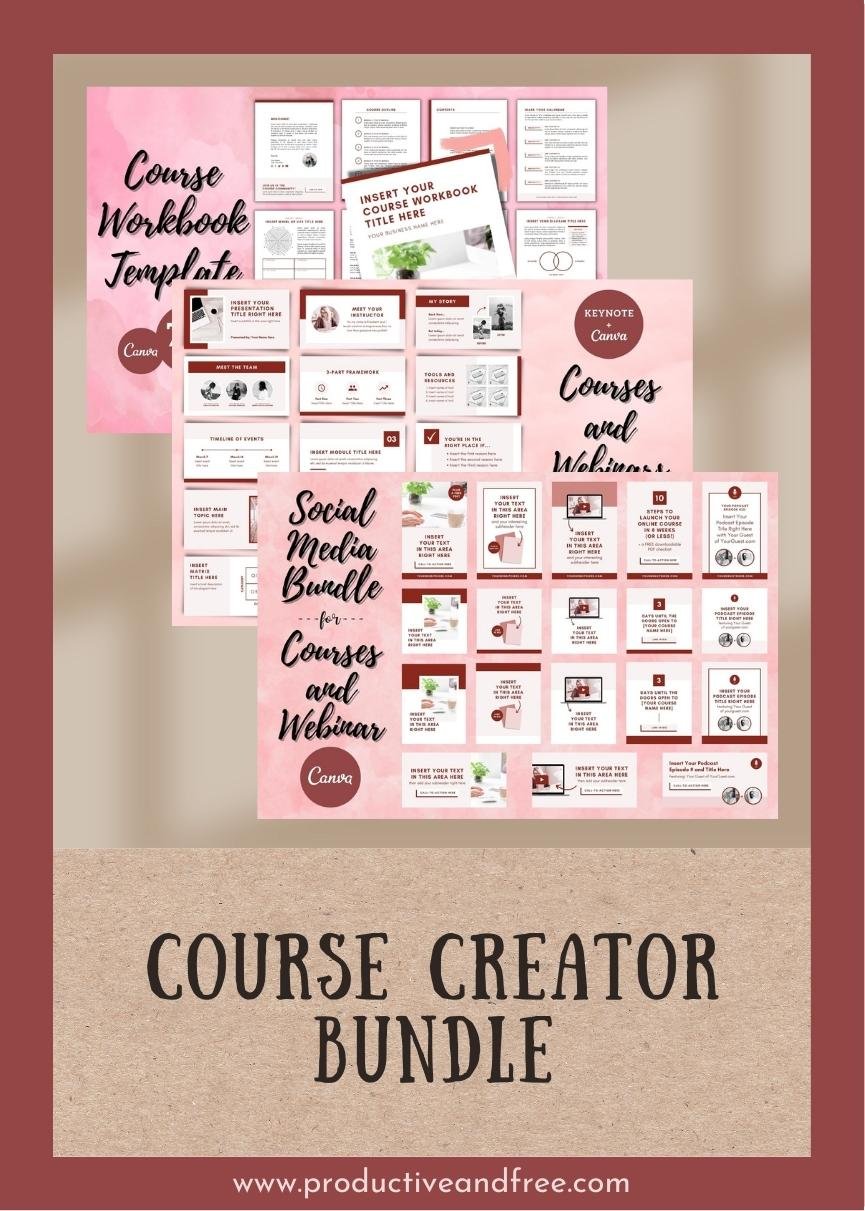
And just in case you don’t want to create everything from scratch or hire a designer to do it for you, this Course Creator Bundle of 150+ Templates can help:
Quick and easy to edit
Fully customizable to match your brand:
Simply add your own photos and text
You can customize the colors, fonts, and layouts
You can mix and match, rearrange and duplicate
Includes FREE lifetime updates
This massive Course Creator Bundle includes:
70+ Workbook Pages (Canva Format; US letter and A4 sizes)
46 Presentation Slides (Canva and Keynote Formats)
40 Social Media Graphics (Canva Format):
8 Pinterest Pins / Blog Post Headers
8 Facebook Posts / Blog Opt In Graphics
8 Instagram Stories / Sidebar Graphics
8 Instagram Posts (Square)
8 Instagram Posts (Portrait)
Plus bonuses:
4 Brand Board Templates (Canva Format)
A link to our curated collection of 60+ free stock photos (from Unsplash)
Please note that the photos and copywriting are not included.
Want to create & sell an online course… without the design headache?
Our Course Creator 150+ Templates Bundle can help!
5. Discounts
Another way to increase the value of your online course is to offer discounts or exclusive trial periods for your other products and/or services.
This is particularly helpful if your other offerings are directly related to your course topic and if it makes sense to purchase those items while completing your course or even after.
You could also provide exclusive discounts or trial periods to partner companies’ products and/or services, again if it makes sense as a complementary tool or resource for your course topic.
This can not only help increase your affiliate income but also strengthen your relationship with your current partner companies and attract potential partners, sponsors, and collaborators too.
6. Templates
A straightforward way to increase the value of your course is to provide solutions that can help your students save time and energy as they get work done.
Examples include templates, swipe files, spreadsheets, scripts, and many more.
Because of the “done-for-you” or “plug-and-play” nature of templates, students don’t need to start from scratch when completing a task so all that saved time may also provide more freedom, less stress, and less overwhelm for your students.
7. Exclusive Invite
Last but not the least, you could offer an opportunity to attend or join an exclusive event, workshop, meet-up, seminar, or conference as part of joining your course.
The idea is that people won’t have access to or be able to purchase tickets to any of these events separately or at a different time. So if they’re very interested in an in-person event with a particular guest or group of people, then the only way for them to participate is to join your course.
Over to You
Pricing an online course may be a tricky task but that doesn’t mean it’s impossible. One of the easiest ways to do it is to provide a couple of added features or bonuses and communicate each one’s value to your potential course student. Remember, in addition to your core course material, the more and better things you add, the easier you can justify charging premium prices.
Need to level-up your webinars & lessons?
Our Slide Deck Template for Webinars and Courses can help — it includes a massive 46 slides you can mix & match in easy-to-edit Canva AND Keynote formats!
Calling all webinar presenters and course creators:
Want to get your audience engaged, empowered, and excited about your offer or lessons?
Want them to stick around and finish watching your presentation?
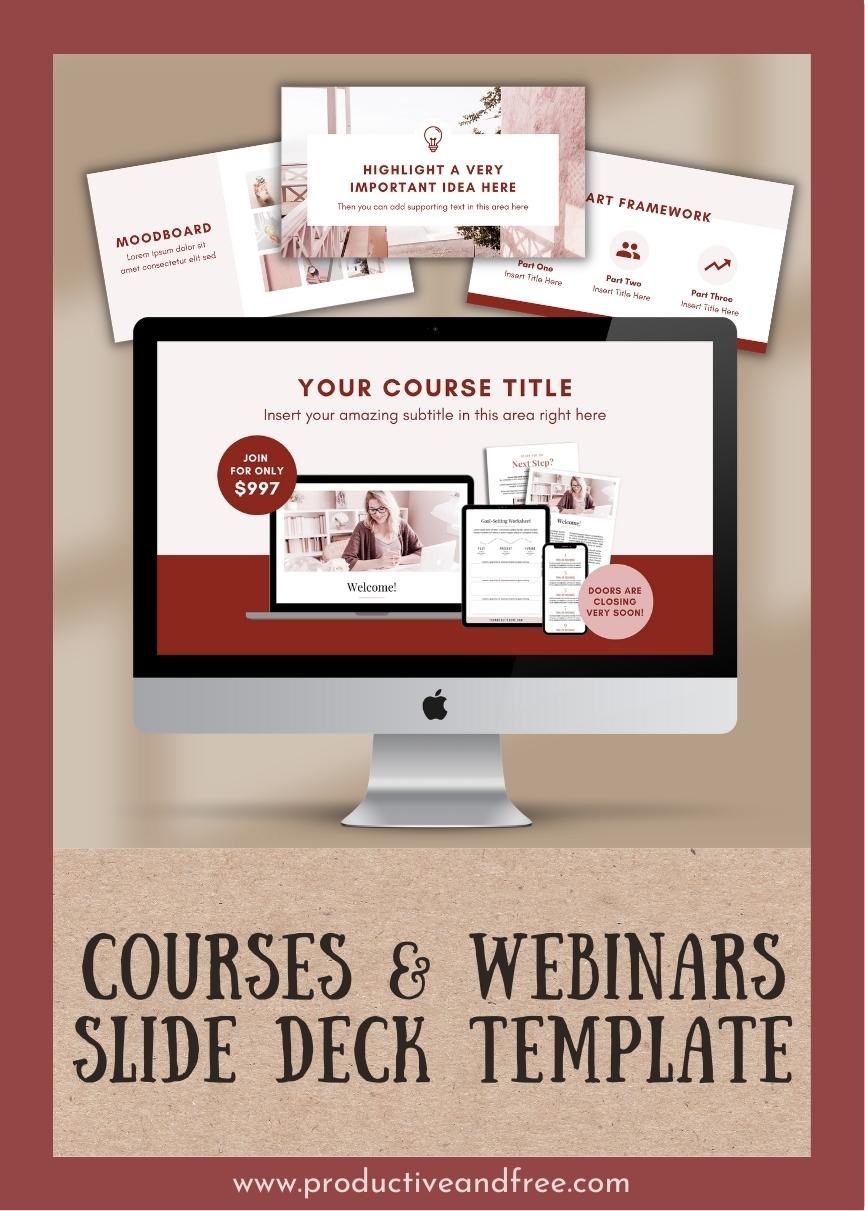
This Slide Deck Template* in Keynote and Canva formats can help!
No need to waste time creating everything from scratch or spend money hiring a designer to do it for you —
These slides were designed to help keep your audience engaged using:
Short texts
Easy-to-read fonts
Clean, bold designs
46 different layouts you can mix & match
Wide format (size: 1920px x 1080px)
*Includes FREE lifetime updates
Save time and money:
Includes 2 formats: Apple Keynote + Canva
Quick and easy to edit yourself
No need to start from scratch or hire a designer
Fully customizable to match your brand
Requirements:
For Canva: a free Canva.com account
For Keynote: the Apple Keynote app + the free font installed in your computer (see the PDF instructions file that comes with your purchase)
This massive set of 46 slides include:
3 title slides
4 presenter intro slides
6 webinar / course intro slides
3 lesson / module intro slides
3 main topic slides
3 lesson highlight slides
3 framework slides
4 high-level concept slides
3 case study / testimonial slides
3 selling / offer slides
2 statistics / formula
2 bullet points / checklist slides
2 moodboards
2 quotes
1 assessment
1 product / software tour
1 thank you / closing slide
Please note: Photos and copywriting are not included with this product. There are slight design variations between the Canva and Keynote slides due to differences in features.